Most WordPress hiring setups grow by accident. One plugin lists the jobs, another collects the forms, and a spreadsheet tracks who applied. Comfort HRM was built as a set of modules from the start. They share the same dashboard style and the same technical foundation, so each plugin fits the next one.
This guide covers what each module does, how they work together, what Pro costs, and how to get a working careers page live on your own site.
What is Comfort HRM?
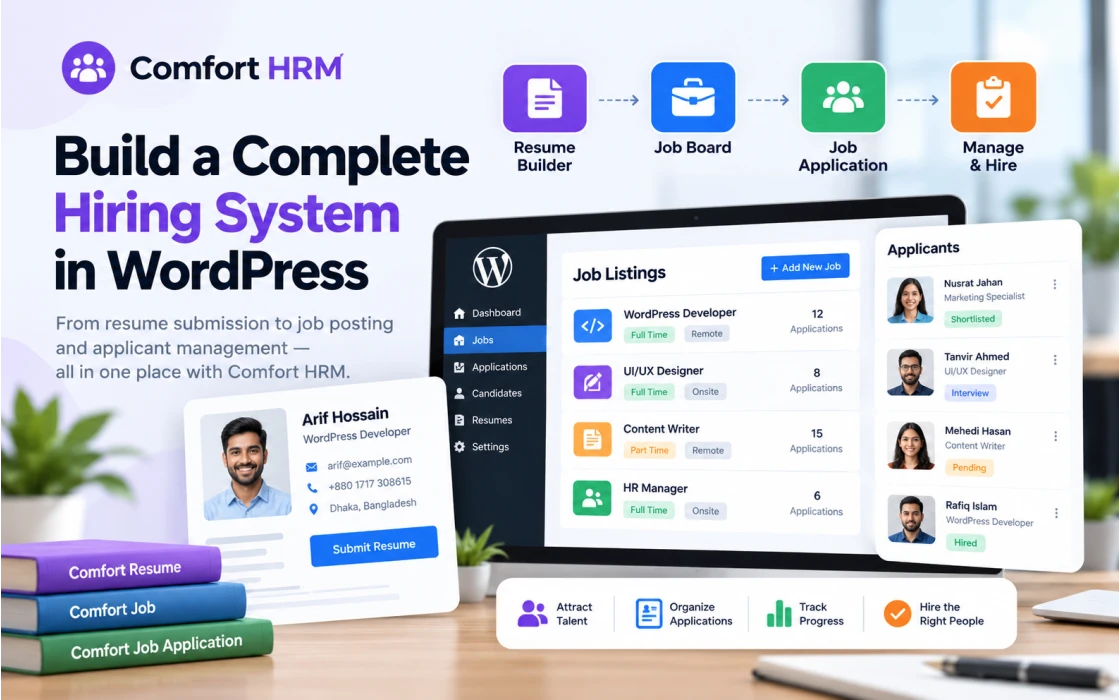
Comfort HRM is a modular HR suite for WordPress, built by Codeboxr. The HRM line has three plugins today: Comfort Resume, Comfort Job and Comfort Job Application. The core plugins are free, and a free bundle puts all of them in one download. Pro add-ons sit on top for teams that need more.
Because the plugins are self-hosted, candidate data stays in your own WordPress database. You pick the theme, the hosting and the rules.
Comfort Resume: build and show resumes inside WordPress

Comfort Resume gives you a resume builder with more than 15 sections. Most sections take multiple entries, so a candidate can list several schools or several jobs without trouble. Guests and logged-in users can create and manage their resumes from a frontend dashboard, which keeps them out of wp-admin.
- Frontend resume submission and management for guests and members
- Resume archive, single resume pages and taxonomy archives, all driven by a WooCommerce-style template system
- Categories and tags built on a WordPress-style custom taxonomy
- JSON export in the free version, PDF export with the Pro add-on
- An email template manager with enable and disable switches per notification
It fits a resume sharing website, a personal portfolio, or a candidate database that a recruiter wants to own. The recruiter-focused write-up goes deeper on the HR side, and the Comfort Resume documentation covers setup.
Comfort Job: a job board that lives on your domain
Comfort Job is the listing engine, positioned as a modern alternative to WP Job Manager. Admins create, moderate and approve jobs from a Vue-powered dashboard. Employers and guests can post from a frontend dashboard, and that works in the free version.
- Job archive, job detail pages and taxonomy archives with AJAX filters and live search
- Category, type and tag management through a custom taxonomy
- Email notifications with template override, in the style WooCommerce users already know
- A company manager in Pro, so a job can be posted as a company or under one
Comfort Job runs fine on its own. Applicants simply reply to the email address on the listing. If you want job categories, types and tags, add the free CBX Taxonomy plugin.
New to job boards? Start with how to add a job posting system without code, then read how Comfort Job turns a site into a hiring machine.
Comfort Job Application: forms and applicant tracking

Comfort Job Application adds the apply step and the tracking behind it. It requires Comfort Job. Once both are active, an Apply button shows on the job details page.
The custom form builder is the part worth a closer look. You can create several application forms and assign a different one to each job. A developer role might ask for a portfolio link. A warehouse role might ask for shift availability. Every job gets the questions it needs and nothing extra.
- A dashboard to review applications, filtered by parameter and hiring step
- Frontend dashboards for employers and for applicants
- Candidates can follow their application and interview steps
- Email notifications with the same template manager as the other modules
Two more reads: Introducing Comfort Job Application and Job Application Forms Made Easy.
How the modules fit together
A typical flow looks like this:
- An employer or admin publishes a job with Comfort Job.
- The job appears in the archive, where visitors filter it or search live.
- A candidate clicks Apply and fills in the form assigned to that job.
- The application lands in the dashboard, and email notifications fire.
- The hiring team moves it through the interview steps, and the candidate can see progress.
Comfort Resume runs beside this flow as its own module. Use it for a resume showcase or a candidate database, and install it only if your project calls for one.
Under the hood: built to scale
Plugins that store everything in post meta tend to slow down once the data piles up. Comfort HRM takes the database seriously from day one.
- Custom tables replace custom post types and meta fields, which keeps queries fast as listings and applications grow.
- Laravel-like migrations manage the schema, with a dashboard interface for tracking table changes.
- Vue.js dashboards talk to a secured REST API, styled with a micro CSS framework instead of a heavy design system.
- Template override works from a child theme, a theme or another plugin through hooks, for public pages and emails alike.
- Built-in SEO and a custom taxonomy manager ship in the box.
If you build for clients, the REST API and the template system matter most. You can restyle every public screen without touching plugin files.
Setting it up
- Download the free bundle with the Download Free Bundle button on the Comfort HRM home page.
- Install and activate Comfort Job. It ships with sensible default settings, so you can post a test job within minutes.
- Add the taxonomy plugin if you want categories, types and tags on jobs.
- Install Comfort Job Application and build your first application form. Assign it to a job.
- Open the email templates and switch on the notifications your team wants.
- Add Comfort Resume if you plan to collect or display resumes.
- Keep the documentation open for details. Each product also has an FAQ page: Comfort Job, Comfort Job Application and Comfort Resume.
Pricing
The core plugins cost nothing. Pro licences use the same price ladder across all three HRM plugins. Each licence includes updates, Pro support and one test domain.
| Sites | 1 year | Lifetime |
|---|---|---|
| 1 site | $29 | $49 |
| 2 sites | $39 | $79 |
| 5 sites | $49 | $99 |
The 5-site tier also includes live support over Skype, Google Meet, Teams or Zoom. A client project with a single domain fits the 1-site licence. An agency with several client sites gets the best value from the 5-site lifetime plan.
When the business grows
A hiring system tends to arrive with other needs. Payroll questions come up, then invoices, then stock. Codeboxr covers that side with the Comfort ERP line, built on the same WordPress-native approach. Comfort Accounting handles the books from the WordPress dashboard, and Comfort Inventory & Invoice handles stock and billing. Browse the full range at comforterp.com, or see more WordPress products at Codeboxr.
Frequently asked questions
Do I need Comfort Job to use Comfort Job Application?
Yes. Comfort Job Application adds the application layer on top of Comfort Job, so install Comfort Job first.
Can Comfort Job run on its own?
Yes. Applicants reply to the email address you provide. For job categories, types and tags, install the free taxonomy plugin.
Is frontend job submission a Pro feature?
No. Employers and guests can submit jobs from the frontend in the free version.
Can Comfort Resume export a resume as PDF?
PDF export comes with the Pro add-on. JSON export is available without it.
Is there a free version of Comfort HRM?
Yes. The core plugins are free, and the free bundle is a single download from the home page.
Start with the free bundle
Install the core plugins, post a test job and run an application through the form. If the workflow fits, pick a Pro licence for company management, PDF export and priority support. Questions first? Contact the team.